✦ Live interview answers ✦ Instant Meeting Notes ✦ Live AI Assistance ✦ Private & Secure ✦ Live AI Assistance ✦ Private & Secure


ShadowPilot

Windows & macOS

Used by 50,000+ job seekers
★★★★★ 4.8 from 6,200+ reviews
ShadowPilot-Dashboard-hero

As featured on

msn USA TODAY yahoo! Medium

Shadow Pilot verified private and secure · Windows & macOS

Real people, real interviews

Everyone is already using it.

Hundreds of creators are posting their Copilot moment. Here are a few doing the rounds right now.

How it works

Three steps. Zero panic.

No downloads on the interviewer’s side. No bot joining the call. Nothing on your screen share.

1

Upload your resume once

ShadowPilot reads your experience, projects and numbers so every answer sounds like you, not like a chatbot.

2

Copilot listens live

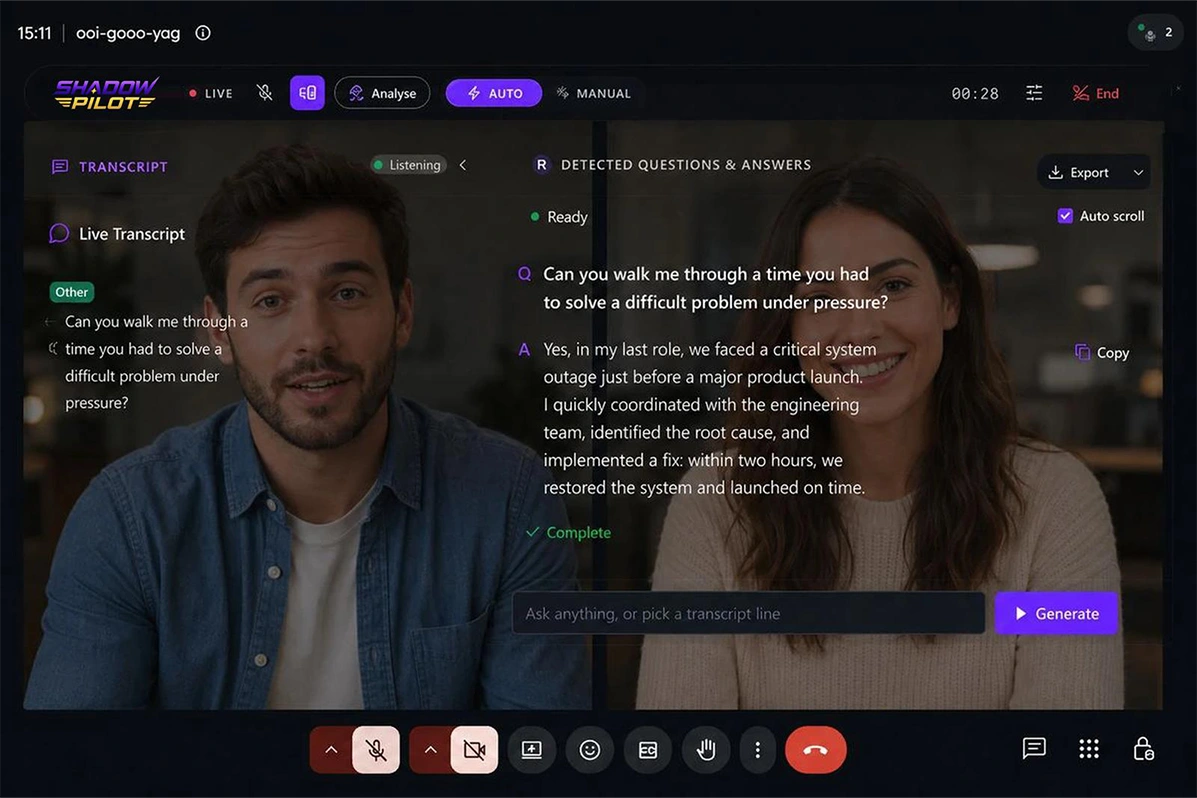
Open your session before the call. Copilot transcribes system audio in real time and flags every question as it lands.
3

Read a perfect answer

A tailored, STAR-structured answer appears in under a second. Glance, deliver, move on.

300ms

Average answer speed

12+

Languages supported

95%

Transcription accuracy

50K+

Job seekers helped

Auto answer & Screen Analyze

It hears the question, and reads the screen

Auto mode fires an answer the instant a question is detected. Screen Analyze reads your screen, so written questions get solved too.

Built for trust

Private, invisible, and yours alone.

ShadowPilot never joins your call and never appears on a guest list. With Shadow Pilot on the Windows and macOS desktop app, it never shows up in a screen share either.

🫥

VERIFIED

Invisible everywhere

ShadowPilot stays out of screen shares, recordings, the dock and task manager on Windows and macOS.

🚫

VERIFIED

No bot in the meeting

Nothing joins the call. No extra participant, no recording notice, no awkward questions.

🔒

Your data stays yours

Encrypted end to end. Delete your resume, documents and transcripts any time.

🎧

Headphones work fine

Copilot reads system audio directly, not your speakers.

What they say after

Offers, not anxiety.

Real feedback from job seekers using Interview Copilot.
★★★★★
Interview Copilot helped me stay focused during my technical interview. Instead of freezing on behavioral questions, I had clear talking points and felt much more confident.
SM
Sarah M.
Software Engineer
★★★★★
The AI anticipated many of the questions I actually received. I walked into the interview feeling much more prepared than usual.
EC
Emily C.
Product Manager
★★★★★
The behavioral coaching was my favorite feature. I answered difficult questions with much more confidence and clarity.
EC
Ashley P.
HR Specialist
★★★★★
The live suggestions felt natural and helped me organize my answers. It was like having a coach sitting beside me without being distracting.
DK
David K.
Project Manager
★★★★★
I liked that it kept responses concise. It stopped me from rambling and helped me communicate my experience much more effectively.
JW
James W.
Data Analyst
★★★★★
The live suggestions felt natural and helped me organize my answers. It was like having a coach sitting beside me without being distracting.
DH
Daniel H.
Cybersecurity Analyst
★★★★★
I used it for three interviews in one week. The STAR response guidance was incredibly helpful and made my answers much more structured.
PR
Priya R.
Business Analyst
★★★★★
The confidence boost alone made it worth trying. I felt more relaxed knowing I had intelligent guidance available when I needed it.
MG
Maria G.
UX Designer
★★★★★
The interface is clean, easy to use, and doesn’t get in the way. It feels like a professional interview coach rather than another AI chatbot.
JN
Jessica N.
Marketing Manager
★★★★★
I normally struggle with explaining complex projects. Interview Copilot reminded me to highlight impact instead of just listing responsibilities.
MT
Michael T.
DevOps Engineer
★★★★★
The technical prompts were surprisingly relevant. It helped me explain AWS architecture and automation projects in a way interviewers appreciated.
KL
Kevin L.
Cloud Engineer
★★★★★
Probably one of the most useful interview preparation tools I’ve tried. It helped me stay calm, answer confidently, and communicate my value much better.
CB
Chris B.
Full Stack Developer

Support

Frequently asked questions

Is ShadowPilot Copilot really private & secure?

Yes, with ShadowPilot on the Windows and macOS desktop app. It runs invisibly at the system level rather than as a meeting participant, so it does not appear in screen shares, recordings, the dock, task manager or tab switching. We re-verify against Zoom, Meet, Teams, Webex, Chime, HackerRank and CoderPad. If you are on Zoom, keep it updated and enable advanced capture with window filtering. The browser version gives the same real-time answers but without system-level invisibility.
ShadowPilot is the private & secure mode in the ShadowPilot desktop app for Windows and macOS. It runs Copilot at the system level so it never appears in a screen share, recording, dock or task manager. The browser version gives you the same real-time answers without the system-level invisibility.
ShadowPilot is the private & secure in the ShadowPilot desktop app for Windows and macOS. It runs Copilot at the system level so it never appears in a screen share, recording, dock or task manager. The browser version gives you the same real-time answers without the system-level invisibility.
ShadowPilot offer a 10min test session only to check your microphone and your settings are working, plus access to the wider platform. When you are ready, upgrade to Standard or Premium for full Copilot access.
Interview Copilot and Shadow Pilot are available with our Interview Copilot plans. Choose Starter, Pro, or Ultimate based on the number of interview minutes you need. Additional minutes can be purchased anytime.
ShadowPilot includes a free 10-minute trial session so you can test your microphone, camera, and settings before upgrading.
Upload your resume once and Copilot builds answers from your real projects, roles and numbers. You can add supporting documents and paste extra context or instructions when creating a session, so answers stay grounded in your actual background.
Yes. Copilot listens for coding questions, and Screen Analyze reads whatever is on your screen, so written exam questions, online assessments and LeetCode-style problems get solved too. It walks you through the approach and the code, not just the answer.
Over 12, including English, Spanish, Hindi, Mandarin, French and German. Copilot listens in one language at a time, so pick your session language before the call and it will respond in the same language.
Yes. Copilot reads system audio directly rather than what comes out of your speakers, so headphones work perfectly and accuracy is unchanged.

Walk into your next interview already knowing the answer.

Try Interview Copilot with a free 10-minute live session. Then unlock unlimited interviews with a Copilot Plan.
Works on Zoom, Google Meet, Microsoft Teams, Webex, Chime, HackerRank and phone screens.